Gemini now edits your documents too
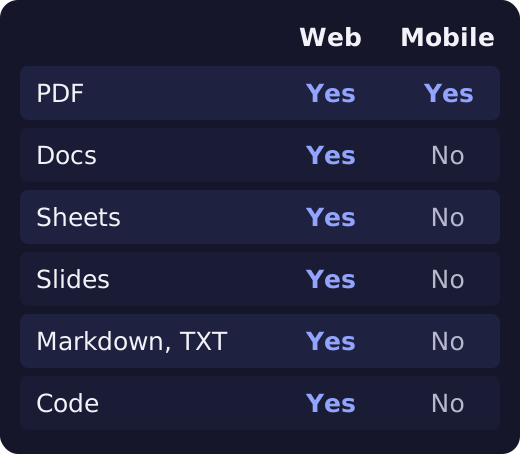
On October 29, 2026, Google opened a feature for creating, previewing and editing files inside the Gemini app. PDFs work on web and mobile; documents, sheets, presentations, Markdown, TXT and code work on the web. Both personal accounts and Workspace can use it.
Key facts
| Released | October 29, 2026 |
|---|---|
| Files | Documents, sheets, presentations, Markdown, TXT, code, PDF, Google Docs, LaTeX |
| Mobile | PDF only |
| Available to | Workspace customers, Workspace Individual, personal accounts |
| Languages | All languages the Gemini app supports |
| Admin setting | No separate setting to turn off only this feature |
What happened
According to Google Workspace Updates, you can now create, preview and edit files inside a Gemini app chat. You can open a file full screen and type directly, select text and ask about it, or ask Gemini to refine it.
Why it is easier
Our reading: work that used to mean copying an answer and editing it in another app can now continue in the chat window. Google's post does not directly compare this with the previous workflow.
What you can do with each file type
- Presentations: create an outline or content, review the layout in the chat, then edit. Open in Google Slides or download as PPTX or PDF.
- Google Sheets: create tables, trackers and data models, preview them, and open them in Sheets.
- Documents and PDFs: write and edit PDF, Google Docs, LaTeX, Markdown and TXT, and upload them to Drive.
Where it works
On phones, you can preview and edit PDFs only. Other formats work on the web.
Who can use it
- All Google Workspace customers, Workspace Individual and personal Google accounts.
- It works in every language the Gemini app supports.
- The post does not mention plan limits or file size limits.
- Admins have no setting to turn off only this feature. They use the setting that turns the whole Gemini app on or off.
Try it
- In the Gemini app, name the file format you want and ask Gemini to create it.
- Preview it in the chat, then open it full screen.
- Type your edits directly, or select a part and ask Gemini.
- Open presentations or sheets in Slides or Sheets to continue.
Sources
Questions
Can I edit on my phone?
PDFs work on both web and mobile. Other formats work on the web.
Do I need a paid plan?
The announcement says Workspace customers, Workspace Individual and personal Google accounts can all use it.
Can I download presentations as files?
Yes. You can open them in Google Slides or download them as PPTX or PDF.